Understanding how to start a business on Shopify goes beyond launching a website; it is about building a scalable online brand in a fast-growing digital economy.
Shopify reported more than $378 billion in merchant sales volume in 2025 alone, showing how quickly global e-commerce continues to expand.
However, success on Shopify is not just about launching a website. To build a profitable e-commerce business on Shopify, you need a clear strategy for how to sell on Shopify, attract customers, and create a store people trust.
This guide will walk you through selling on Shopify step-by-step.
Key Takeaways
- Shopify gives entrepreneurs a fast and scalable way to build a global online business.
- Successful Shopify stores focus more on branding, positioning, and customer trust than flashy design.
- A strong Shopify store setup combines the right products, seamless payments, SEO, and marketing systems.
- Long-term growth on Shopify depends on consistent traffic, customer retention, and smart automation.

What Is Shopify?
Shopify is a cloud-based e-commerce platform that helps individuals and businesses create, manage, and grow online stores.
It provides everything needed to run an e-commerce business, including website creation, payment processing, inventory management, shipping tools, and marketing integrations.
Founded in 2006, Shopify has become one of the world’s leading e-commerce platforms, powering millions of businesses globally.
Its ease of use, flexibility, and scalability make it ideal for both beginners and established brands looking to sell products online.
Understanding the Different Shopify Business Models
One of the biggest advantages of using Shopify is its flexibility. Entrepreneurs can build different types of businesses on the platform depending on their budget, skills, products, and long-term goals.
Some business models require little upfront investment, while others focus on building a long-term brand with higher profit margins and customer loyalty.
Understanding these models will help you choose the right path before starting your Shopify store.
| Shopify Business Model | How It Works | Best For | Key Advantage |
|---|---|---|---|
| Dropshipping | You sell products without holding inventory. Suppliers ship directly to customers. | Beginners with low startup capital | Low upfront investment |
| Print on Demand | Custom designs are printed on products only after customers place orders. | Creatives, designers, and niche brands | No inventory risk |
| Selling Your Own Products | You create, source, or manufacture products and sell directly to customers. | Entrepreneurs building long-term brands | Higher profit margins |
| Digital Products | You sell e-books, templates, courses, software, or digital downloads online. | Experts, creators, and educators | High scalability |
| Subscription Business | Customers pay regularly for recurring products or services. | Brands focused on recurring revenue | Predictable income |
| Wholesale and B2B | You sell products in bulk to retailers or other businesses. | Manufacturers and large suppliers | Larger order values |
How to Start a Business on Shopify Step-by-Step
Starting a business on Shopify is easier today than ever before, but building a profitable store still requires careful planning and execution.
Beyond creating a website, you need the right business model, a product people actually want, a strong brand identity, and systems that make it easy for customers to buy from you.
Below, we will break down how to set up a Shopify store in 11 practical steps.
Step 1: Choose a Business Model and Product
Before setting up your Shopify store, decide what you want to sell and how you plan to sell it.
Many beginners rush into store design without validating a product or understanding their business model. That usually leads to poor sales and wasted marketing spend.
Shopify supports various e-commerce models, including dropshipping, print-on-demand, digital products, subscriptions, and traditional inventory-based stores.
The right option depends on your budget, experience, and long-term goals.
| Business Model | Startup Cost | Inventory Needed | Best For |
|---|---|---|---|
| Dropshipping | Low | No | Beginners testing products |
| Print on Demand | Low | No | Creators and niche brands |
| Digital Products | Very Low | No | Coaches, writers, designers |
| Own Products | Medium to High | Yes | Long-term brand building |
| Subscription Store | Medium | Sometimes | Recurring revenue businesses |
Once you choose a model, focus on products with clear demand and a specific audience.
According to Shopify, niche-focused stores often perform better because they target customers with defined interests and buying intent.
Good product research usually starts with:
- TikTok trends and Instagram shops
- Amazon best sellers
- Google Trends
- Reddit communities
- Customer reviews on competitor stores
Avoid selling random trending products without a clear audience.
Strong Shopify businesses are usually built around solving a problem, improving convenience, or creating a unique brand experience.
Step 2: Create Your Shopify Account
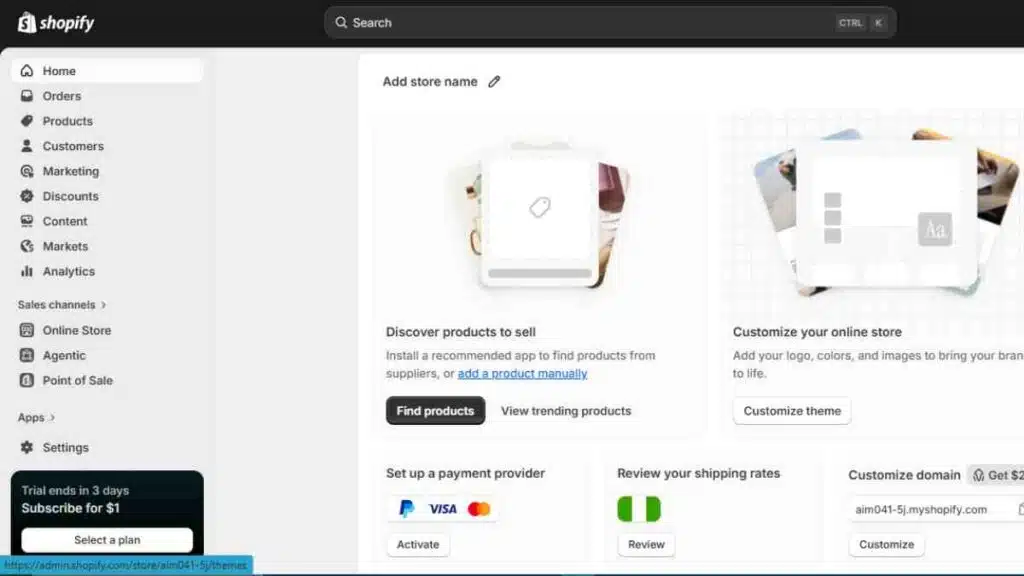
After deciding on your business model and products, the next step is to create your Shopify account. Shopify makes the setup process beginner-friendly, allowing entrepreneurs to launch a store without coding experience.
To get started, visit Shopify’s website and sign up using your email address.
The platform will ask a few questions about your business, including what you plan to sell and where you are in your business journey.
These answers help customise your dashboard and recommended setup tools.
| Setup Requirement | Details |
|---|---|
| Email Address | Used to create and manage your account |
| Store Name | Becomes your default Shopify URL initially |
| Password | Secures your store account |
| Business Information | Helps personalise your setup experience |
During setup, Shopify automatically creates a temporary domain like: yourstorename.myshopify.com.
You can later connect a custom domain to make your store look more professional and trustworthy.
Shopify also offers a 3-day free trial period, which gives beginners time to explore the dashboard, upload products, test themes, and understand the platform before committing to a paid plan.
Use this stage to familiarise yourself with the admin panel, product section, analytics dashboard, and settings menu before launching publicly.

Step 3: Choose and Connect a Domain Name
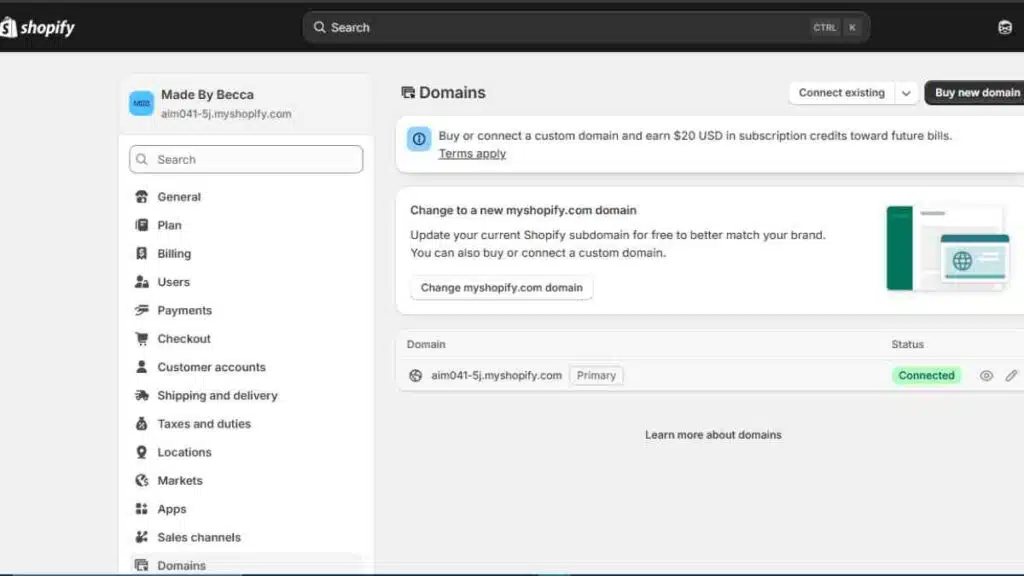
Your domain name is your store’s online identity. While Shopify gives every new store a default URL, using a custom domain makes your business look more professional and easier for customers to remember.
A strong domain name should be:
- Short and simple
- Easy to spell
- Relevant to your brand or niche
- Easy to remember across social media and search engines
| Domain Option | Description |
|---|---|
| Free Shopify URL | Comes with every new store |
| Custom Domain | A branded website address like yourbrand.com |
| Existing Domain | A domain you already own from another provider |
You can buy a domain directly through Shopify or connect one from providers like GoDaddy or Namecheap.
Shopify automatically handles much of the technical configuration, making the connection process straightforward for beginners.
When choosing a domain, avoid names that are too long, difficult to pronounce, or filled with numbers and symbols. A clean and brandable domain improves credibility and helps customers trust your store more quickly.
If possible, secure matching social media handles alongside your domain name to maintain consistent branding across platforms.
Step 4: Select the Right Shopify Theme
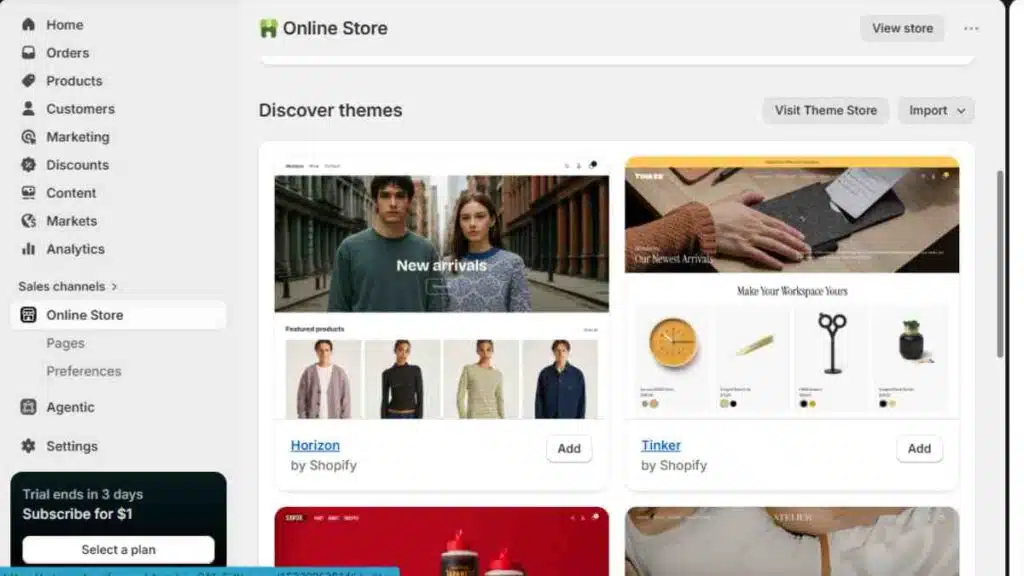
Your theme controls how your store looks, feels, and functions.
On Shopify, themes are more than templates; they directly affect customer experience, mobile usability, page speed, and conversions.
Shopify’s Theme Store includes both free and paid themes designed for different industries such as fashion, beauty, electronics, home décor, and digital products.
Most beginners start with free themes like Dawn, Shopify’s default theme, because it is lightweight, mobile-friendly, and built for fast loading speeds.
| Theme Type | Best For | Price Range |
|---|---|---|
| Free Themes | New stores and beginners | Free |
| Premium Themes | Growing brands needing advanced features | Usually $100–$400 one-time payment |
When choosing a theme, focus less on animations and more on usability. Shopify recommends prioritising:
- Mobile responsiveness
- Fast loading speed
- Simple navigation
- Clear product pages
- Easy checkout flow
A large percentage of Shopify traffic now comes from mobile devices, so a cluttered or slow design can reduce conversions quickly.
Before finalising a theme, preview how it displays:
- Product collections
- Checkout pages
- Navigation menus
- Images and videos
- Customer reviews
Avoid installing a heavily designed theme too early.
Many successful Shopify stores use clean layouts with strong branding, quality product photography, and clear calls to action rather than excessive visual effects.
Step 5: Customise Your Store Design
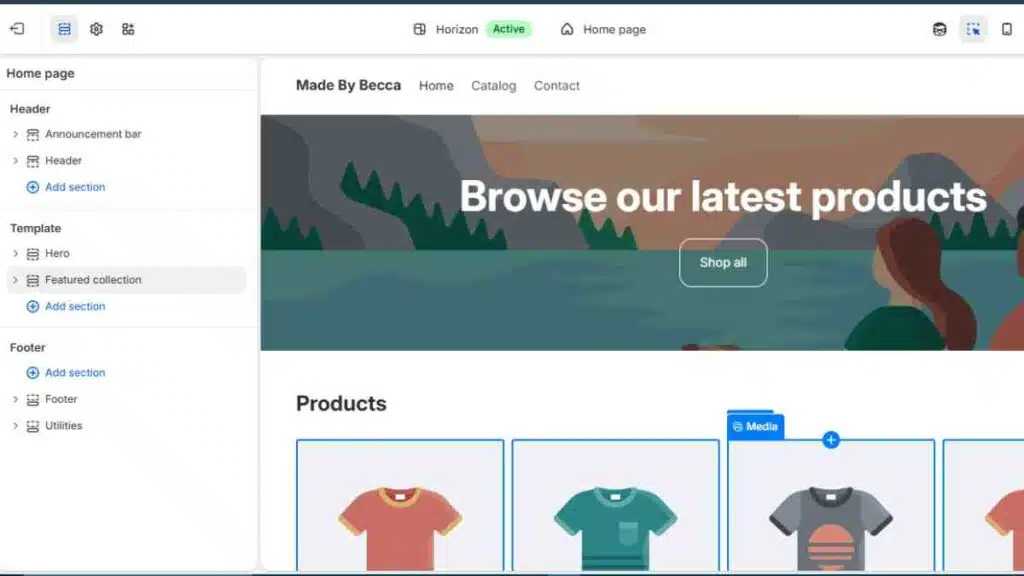
Once you choose a theme, the next step is customising your store to match your brand.
Shopify’s built-in theme editor allows you to adjust colours, fonts, layouts, banners, and homepage sections using drag-and-drop tools, without coding.
Inside the Shopify editor, you can customise:
| Store Element | What You Can Change |
|---|---|
| Homepage | Hero banners, featured products, collections |
| Typography | Fonts, sizes, and text styles |
| Colours | Brand colours and backgrounds |
| Navigation | Menus and category structure |
| Product Pages | Images, descriptions, reviews, buttons |
| Mobile Layout | Mobile spacing and responsiveness |
According to Shopify, stores with clear navigation and strong product visuals tend to create a smoother shopping experience. Customers should be able to understand what you sell within seconds of landing on the homepage.
Keep your design clean and conversion-focused. Many beginners overcrowd their stores with sliders, popups, and unnecessary animations.
High-performing Shopify stores often use:
- Simple navigation menus
- High-quality product photography
- Consistent brand colours
- Clear call-to-action buttons
- Minimal homepage clutter
Your homepage should guide visitors naturally toward products, collections, or offers without distractions. Focus on readability and mobile experience first, since most e-commerce traffic now comes from smartphones.
Step 6: Add Your Products Properly
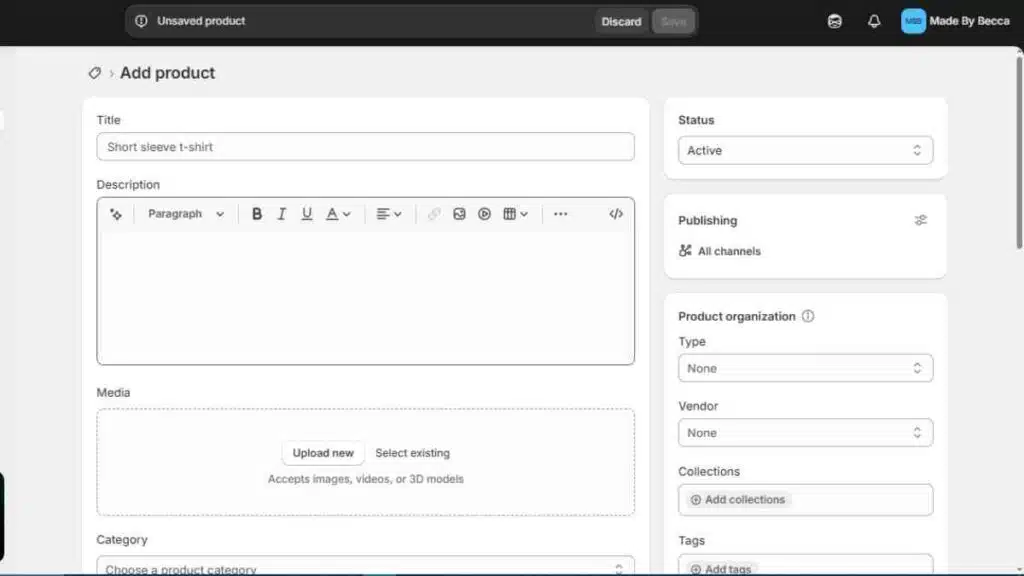
Adding products on Shopify involves more than uploading images and setting prices. Your product pages influence search visibility, customer trust, and conversion rates.
Inside the Shopify dashboard, the Products section allows you to add:
| Product Element | Purpose |
|---|---|
| Product Title | Helps customers and search engines understand the item |
| Description | Explains features, benefits, and usage |
| Images and Videos | Improves trust and buying confidence |
| Pricing | Displays selling price and discounts |
| Inventory | Tracks stock levels |
| Variants | Adds sizes, colours, or styles |
| Shipping Details | Calculates delivery information |
Shopify recommends using clear product titles and detailed descriptions that focus on benefits, not just specifications.
Instead of writing generic copy, explain how the product solves a problem or improves the customer’s experience.
For example, instead of: “Wireless bottle blender with USB charging.” A stronger version would be: “Portable wireless blender designed for smoothies, protein shakes, and travel convenience.”
Product photography also plays a major role in conversions. Shopify advises using multiple high-resolution images with clean backgrounds and different viewing angles.
Stores that include lifestyle photos and short product videos often create stronger engagement.
You should also organise products into collections such as:
- New Arrivals
- Best Sellers
- Men’s Fashion
- Home Essentials
- Fitness Products
This makes navigation easier and improves the shopping experience, especially on mobile devices.

Step 7: Set Up Payments
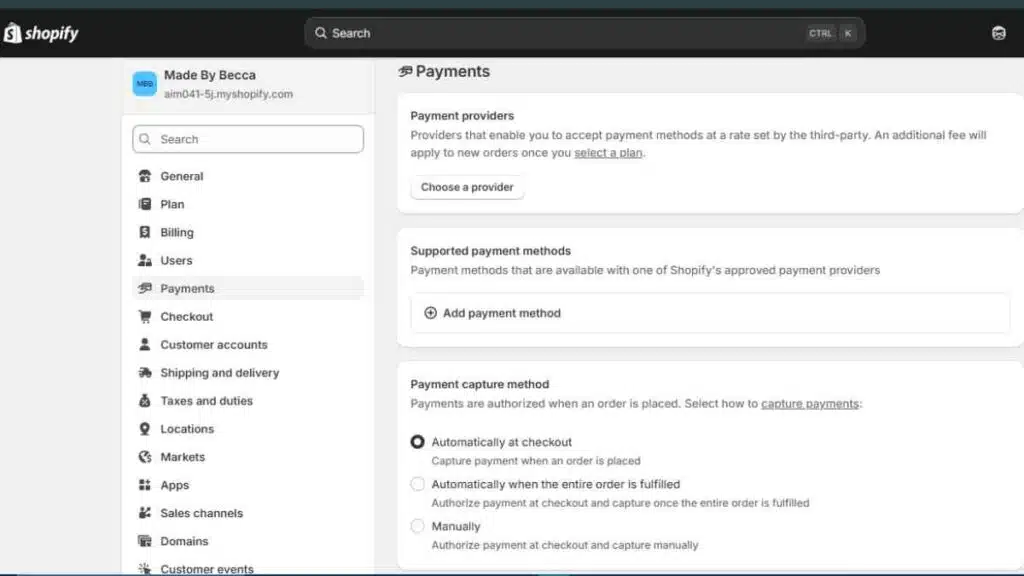
Before launching your store, you need a payment system that allows customers to pay securely and easily.
Shopify supports multiple payment options, including cards, digital wallets, local payment providers, and express checkout methods.
Inside the Shopify dashboard, the Payments section lets you activate payment providers and manage transactions from one place.
| Payment Option | What It Supports |
|---|---|
| Shopify Payments | Card payments and accelerated checkout |
| PayPal | Global online payments |
| Apple Pay & Google Pay | Faster mobile checkout |
| Third-Party Providers | Regional gateways and local payment solutions |
Shopify Payments is Shopify’s built-in payment system available in supported countries. It simplifies setup by allowing merchants to accept major debit and credit cards directly without needing a separate merchant account.
If Shopify Payments is unavailable in your region, Shopify allows integration with third-party providers. The available options vary by country.
During setup, Shopify will request:
- Business information
- Bank account details
- Tax information
- Customer billing settings
A smooth checkout experience is critical for conversions. According to Shopify, complicated payment flows and unexpected fees are among the biggest reasons customers abandon carts during checkout.
To improve trust and reduce drop-offs:
- Enable multiple payment methods
- Display prices clearly
- Use secure checkout badges
- Test the checkout process yourself before launch
You should also activate accelerated checkout options like Shop Pay, Apple Pay, or Google Pay where available, since they reduce friction and make mobile purchases faster.
Step 8: Configure Shipping and Delivery
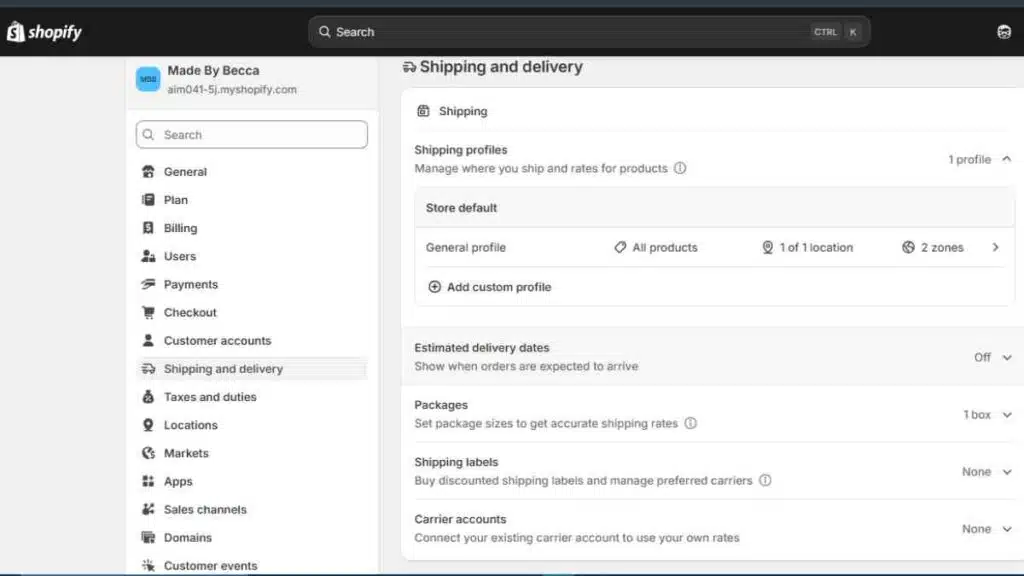
Shipping settings determine how customers receive their orders and how much they pay for delivery.
On Shopify, shipping can be configured directly from the dashboard using shipping profiles, delivery zones, and carrier integrations.
Inside Shopify’s shipping settings, you can create different rates based on:
| Shipping Option | Description |
|---|---|
| Free Shipping | Customers pay nothing for delivery |
| Flat Rate Shipping | One fixed shipping price |
| Carrier-Calculated Rates | Real-time shipping costs from carriers |
| Local Delivery | Delivery within selected locations |
| Local Pickup | Customers collect orders themselves |
Shopify allows merchants to create shipping zones by country or region. This is useful for businesses selling internationally because shipping fees and delivery times often vary across markets.
For physical products, Shopify also lets you:
- Print shipping labels
- Track orders
- Integrate with fulfilment services
- Automate shipping calculations
Many successful Shopify stores use free shipping thresholds to increase average order value. For example:
“Free shipping on orders above $50.”
This strategy often encourages customers to add more products before checkout.
Delivery transparency is also important. Customers should clearly see:
- Shipping costs
- Estimated delivery times
- Return policies
- International delivery availability
Unexpected shipping charges remain one of the leading causes of cart abandonment in ecommerce, so keep shipping rules simple and easy to understand.
Step 9: Create Essential Store Pages
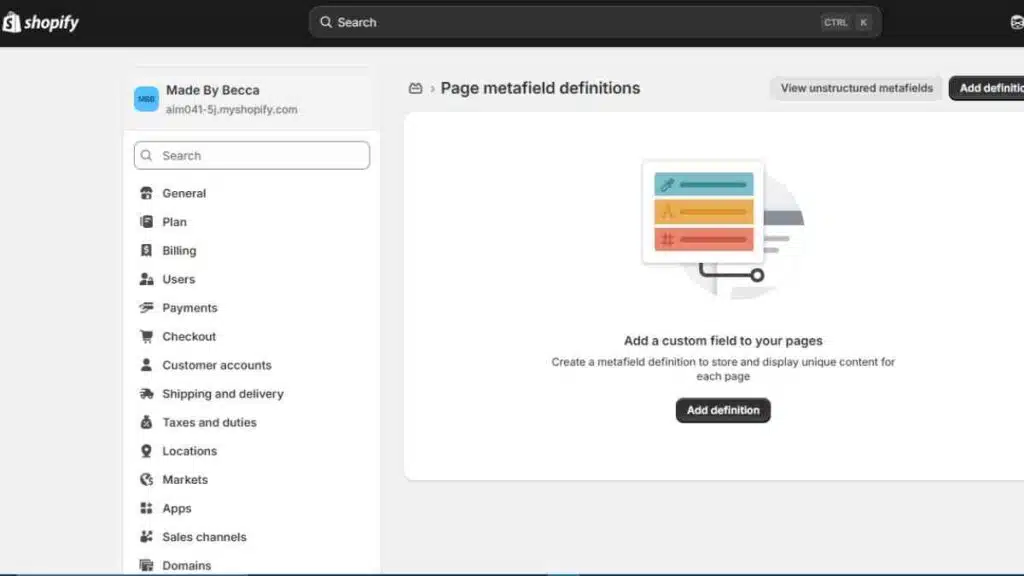
Every professional Shopify store needs key pages that build trust, answer customer questions, and support conversions.
Shopify allows you to create these pages directly from the Online Store >Meta fields and Meta objects > Pages section in your dashboard.
Beyond product pages, customers expect clear business information before making a purchase.
| Essential Page | Purpose |
|---|---|
| About Us | Explains your brand story and mission |
| Contact Page | Gives customers a way to reach you |
| Shipping Policy | Explains delivery timelines and costs |
| Return and Refund Policy | Clarifies exchange and refund conditions |
| Privacy Policy | Explains customer data usage |
| Terms of Service | Covers legal and store conditions |
| FAQ Page | Answers common customer questions |
Shopify provides built-in policy templates for privacy policies, refund policies, and terms of service, which beginners can customise based on their business model and region.
Your About page should feel human and authentic rather than overly corporate. Customers often buy from brands they trust, especially when shopping from a new store.
For contact pages, Shopify allows integration with:
- Contact forms
- Email support
- Social media links
- Live chat apps
You should also make these pages easy to find by adding them to your footer menu or navigation bar.
Hidden policies and unclear contact details can reduce customer confidence during checkout.
Step 10: Install Essential Shopify Apps
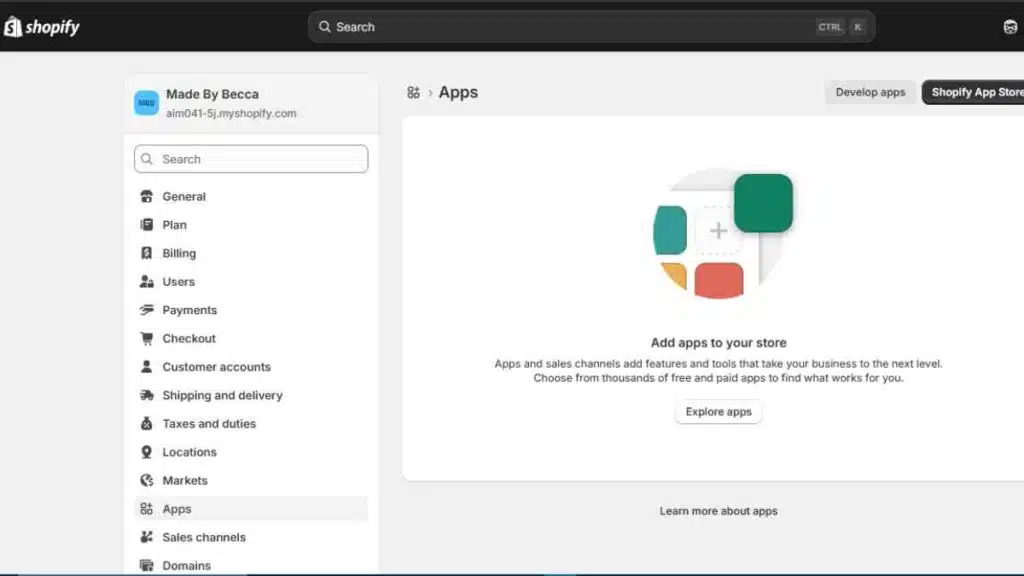
One of the biggest strengths of Shopify is its app ecosystem.
Shopify’s App Store includes thousands of apps that help merchants improve marketing, SEO, customer support, inventory management, reviews, and store performance.
Apps allow beginners to add advanced features without coding or hiring developers.
| App Category | What It Helps With |
|---|---|
| SEO Apps | Improve search visibility |
| Email Marketing | Recover abandoned carts and build customer lists |
| Product Reviews | Build trust and social proof |
| Upsell Apps | Increase average order value |
| Live Chat Tools | Improve customer support |
| Analytics Apps | Track sales and customer behaviour |
Popular Shopify tools include:
- Klaviyo for email marketing
- Judge.me for product reviews
- DSers for dropshipping
- Shopify Inbox for live chat
- Plug In SEO for store optimisation
Shopify also includes some built-in tools that reduce the need for too many third-party apps, especially for beginners.
Be selective during installation. Many new store owners overload their stores with unnecessary apps, which can slow down site speed and create a cluttered backend.
Start with only the tools directly connected to sales, customer experience, and store management.
Before installing any app, check:
- Ratings and reviews
- Monthly pricing
- Mobile compatibility
- Customer support quality
- Impact on store speed
As your business grows, you can gradually expand your app stack based on operational needs and marketing goals.
Step 11: Test and Launch Your Shopify Store
Before making your Shopify store public, test every part of the customer journey.
Many new merchants focus heavily on design but overlook checkout errors, broken links, mobile responsiveness, or slow-loading pages.
A proper pre-launch review helps reduce customer frustration and abandoned carts.
| Area to Test | What to Check |
|---|---|
| Homepage | Banners, navigation, and mobile layout |
| Product Pages | Images, pricing, descriptions, and variants |
| Checkout Process | Payment flow and order confirmation |
| Shipping Settings | Delivery fees and shipping zones |
| Store Speed | Loading time on desktop and mobile |
| Links and Buttons | Navigation and call-to-action buttons |
| Emails and Notifications | Order confirmations and customer emails |
Shopify allows merchants to place test orders using Shopify Payments test mode or Shopify’s Bogus Gateway. This helps you experience the checkout process exactly as a customer would.
You should also review your store on:
- Smartphones
- Tablets
- Different browsers
- Desktop devices
Since most e-commerce traffic now comes from mobile users, your store should load quickly and display properly across screen sizes.
Before launch, remove placeholder content such as:
- Sample product descriptions
- Demo images
- Default theme text
- Test orders
Once everything is working properly, remove your storefront password from the Shopify dashboard and officially launch your store.
Your first version does not need to be perfect. Many successful Shopify businesses improve their stores gradually using customer feedback, analytics, and sales data after launch.
Essential Shopify Apps Every Beginner Should Consider
One reason many entrepreneurs choose Shopify is its extensive app ecosystem.
Shopify’s App Store includes tools that help merchants improve SEO, automate marketing, manage inventory, increase conversions, and support customers more efficiently.
While there are thousands of apps available, beginners should focus on tools that directly improve store performance, customer experience, and sales rather than installing unnecessary features too early.
| App | Category | What It Does |
|---|---|---|
| Klaviyo | Email Marketing | Automates emails, abandoned cart recovery, and customer campaigns |
| Judge.me | Product Reviews | Collects and displays customer reviews and ratings |
| DSers | Dropshipping | Helps import and manage dropshipping products |
| Shopify Inbox | Customer Support | Adds live chat and customer messaging |
| Plug In SEO | SEO Optimisation | Identifies SEO issues and store optimisation opportunities |
| ReConvert | Upselling | Creates post-purchase upsell offers |
| TinyIMG | Image Optimisation | Compresses images to improve store speed |
| PageFly | Page Builder | Allows advanced landing page customisation |
Before installing any app, check:
- Pricing structure
- User reviews and ratings
- Mobile compatibility
- Customer support quality
- Impact on website speed
Many successful Shopify stores keep their app stack lean, especially during the early stages.
Too many apps can slow down your store, complicate management, and increase monthly operating costs unnecessarily.
How Much Does It Cost to Set Up a Shopify Store?
The cost of setting up a Shopify store depends on your business model, tools, and marketing strategy.
While Shopify allows beginners to start with relatively low upfront costs, running a professional e-commerce store still requires budgeting for design, apps, domains, and customer acquisition.
Many new entrepreneurs can launch a basic Shopify store with less than $200, especially if they use free themes and low-cost marketing methods at the beginning.
| Expense | Estimated Cost |
|---|---|
| Shopify Basic Plan | Around $39/month |
| Domain Name | $10–$30/year |
| Premium Theme (Optional) | $100–$400 one-time |
| Shopify Apps | $0–$100+/month |
| Product Inventory | Varies by business model |
| Marketing and Ads | Flexible budget |
| Logo and Branding | Optional but recommended |
Realistic Beginner Budget Breakdown
A beginner does not need thousands of dollars to start a Shopify store. The actual cost depends on your business model, product type, and marketing approach.
Many first-time store owners start lean, validate demand, then scale gradually as sales grow.
Here is a realistic estimate for launching a small Shopify store:
| Expense Category | Budget Option | Estimated Cost |
|---|---|---|
| Shopify Basic Plan | Monthly subscription | Around $39/month |
| Domain Name | Custom domain | $10–$30/year |
| Theme | Free Shopify theme | Free |
| Essential Apps | Reviews, email, SEO | $0–$50/month |
| Logo and Branding | DIY tools or freelancer | $0–$100 |
| Product Samples | Testing quality | $20–$200 |
| Marketing Budget | Social media or ads | $50–$300 |
| Product Inventory | Depends on business model | Flexible |
| Business Model | Estimated Startup Budget |
|---|---|
| Dropshipping | $100–$500 |
| Print on Demand | $100–$400 |
| Digital Products | Under $200 |
| Inventory-Based Store | $500–$5,000+ |
Many successful Shopify stores started with simple setups, free themes, and small product catalogues.
Instead of spending heavily upfront, beginners often see better results by investing gradually in marketing, customer experience, and product improvement after validating demand.

Shopify SEO: How to Get Free Organic Traffic
Search engine optimisation (SEO) helps your Shopify store appear in Google search results when people search for products related to your business.
Unlike paid ads, organic traffic can generate long-term visitors and sales without continuous advertising costs.
Shopify includes several built-in SEO features, including editable title tags, meta descriptions, mobile-friendly themes, automatic sitemap generation, and SSL security.
However, ranking on Google still depends on how well you optimise your store content and structure.
| Shopify SEO Area | What to Optimise |
|---|---|
| Product Pages | Titles, descriptions, keywords, images |
| Collection Pages | Category descriptions and internal links |
| Blog Content | Informational articles targeting search intent |
| Image SEO | Alt text and compressed file sizes |
| Store Speed | Fast-loading pages and mobile optimisation |
| URLs and Metadata | Clean slugs and keyword-focused titles |
Strong Shopify SEO starts with keyword research. Instead of targeting broad keywords with heavy competition, focus on specific search phrases customers actually use.
For example:
- “Minimalist office desk lamp”
- “Organic skincare for sensitive skin”
- “Wireless headphones for gym workouts”
Shopify also recommends using descriptive product titles and original product descriptions rather than copying supplier content. Duplicate descriptions can weaken search visibility.
To improve organic traffic:
- Add keywords naturally to product pages
- Write blog articles related to your niche
- Optimise image alt text
- Improve mobile experience
- Build internal links between pages
- Use fast-loading themes and compressed images
Content marketing is another powerful SEO strategy. Many successful Shopify stores publish blogs, buying guides, tutorials, and product comparisons to attract search traffic from Google.
For example, a fitness brand selling resistance bands could publish articles like:
- Best Home Workout Equipment for Small Spaces
- Resistance Band Exercises for Beginners
- How to Build a Home Gym on a Budget
This strategy attracts potential customers before they are ready to buy and builds authority within a niche.
SEO takes time, but it often becomes one of the most profitable traffic sources for long-term Shopify growth because it compounds over time without requiring daily ad spend.
Taxes on Shopify: What Every Store Owner Should Know
Running a business on Shopify also means handling taxes properly. Many beginners focus on products, design, and marketing but overlook tax obligations until sales start growing.
Shopify simplifies part of the process by allowing merchants to automate tax calculations, collect sales taxes, and generate financial reports directly from the dashboard.
However, Shopify does not pay taxes on your behalf in most cases.
Store owners are still responsible for understanding local tax laws, collecting the correct taxes where required, and remitting payments to the appropriate tax authorities.
How Taxes Work on Shopify
Shopify allows merchants to configure tax settings based on the countries or regions where they sell.
The platform can automatically calculate taxes during checkout depending on the customer’s location and applicable tax rules.
| Tax Feature | What It Does |
|---|---|
| Automatic Tax Calculations | Calculates taxes during checkout |
| Regional Tax Settings | Applies country or state-specific tax rules |
| VAT and GST Support | Supports international tax systems |
| Tax Reports | Tracks collected taxes for reporting |
| Tax Overrides | Allows manual adjustments for specific products |
Shopify Tax is available in selected regions and helps merchants manage changing tax rates more efficiently, especially for businesses selling internationally.
Types of Taxes Shopify Sellers May Need to Handle
The taxes you pay depend on your country, business structure, and where your customers are located.
| Tax Type | Commonly Applies To |
|---|---|
| Sales Tax | Businesses selling in the United States |
| VAT (Value Added Tax) | Europe, UK, and many international markets |
| GST (Goods and Services Tax) | Countries like Australia, Canada, and India |
| Import Duties | International shipments crossing borders |
| Income Tax | Profits earned from the business |
For example, sellers in Europe may need to charge VAT on products sold to customers within certain countries, while U.S.-based businesses may need to collect state sales taxes depending on nexus rules.
Setting Up Taxes on Shopify
Inside your Shopify admin dashboard, tax settings can be configured under:
Settings → Taxes and Duties
From there, you can:
- Add tax registration numbers
- Enable automatic tax collection
- Set tax-inclusive or tax-exclusive pricing
- Manage regional tax rules
- Configure duties for international sales
Shopify also allows some stores to display estimated import duties and taxes at checkout, which helps reduce unexpected charges for international customers.
Keeping Tax Records and Paying Taxes
Shopify generates financial reports that help merchants track:
- Sales revenue
- Collected taxes
- Refunds
- Shipping charges
- Payment fees
These reports can simplify bookkeeping and make tax filing easier during reporting periods.
Most businesses still need to:
- Register for taxes where required
- File tax returns
- Pay collected taxes to government authorities
- Maintain proper accounting records
Many Shopify merchants eventually use accounting software like QuickBooks or Xero to manage tax reporting and financial tracking more efficiently.
Common Tax Mistakes Beginners Make
| Mistake | Result |
|---|---|
| Ignoring tax obligations | Penalties or compliance issues |
| Charging incorrect tax rates | Customer disputes or underpayment |
| Forgetting international tax rules | Unexpected liabilities |
| Poor record keeping | Filing difficulties |
| Mixing personal and business finances | Accounting complications |
Taxes can become more complex as a Shopify business grows internationally.
For that reason, many entrepreneurs eventually consult accountants or tax professionals familiar with e-commerce businesses and cross-border sales.
How to Market Your Shopify Store
Launching a Shopify store is only the beginning. Without marketing, even well-designed stores struggle to generate traffic and sales.
Successful Shopify businesses combine multiple marketing channels to attract customers, build trust, and increase repeat purchases over time.
Most beginner stores grow faster when they focus on consistent visibility rather than trying every marketing strategy at once.
| Marketing Strategy | How It Helps |
|---|---|
| Search Engine Optimisation (SEO) | Brings long-term organic traffic from Google |
| Social Media Marketing | Builds brand awareness and engagement |
| TikTok and Instagram Reels | Helps products reach large audiences quickly |
| Email Marketing | Recovers abandoned carts and drives repeat sales |
| Influencer Marketing | Builds trust through creator recommendations |
| Pinterest Marketing | Generates traffic for visual and lifestyle products |
| Paid Advertising | Brings faster traffic through targeted campaigns |
| Content Marketing | Attracts customers through blogs and guides |
| Referral Programmes | Encourages customers to invite others |
| Retargeting Ads | Re-engages visitors who did not buy initially |
Shopify also integrates directly with platforms like Facebook, Instagram, TikTok, YouTube, Pinterest and Google Shopping.
This allows merchants to manage products and marketing campaigns from one dashboard.
For beginners, organic content marketing often works well alongside smaller advertising budgets.
Short-form videos, customer testimonials, tutorials, and behind-the-scenes content can build attention without requiring large upfront spending.
Email marketing is another important growth channel many new stores ignore.
Shopify data consistently shows that returning customers often spend more than first-time buyers, making retention strategies valuable for long-term profitability.
Instead of trying to go viral immediately, focus on:
- Understanding your audience
- Creating consistent content
- Improving customer trust
- Building an email list
- Testing different traffic sources gradually
Many successful Shopify brands grow steadily by combining SEO, social media, customer retention, and community building rather than relying only on paid ads.
Common Shopify Mistakes Beginners Should Avoid
Many new entrepreneurs assume launching a Shopify store is simply about uploading products and running ads.
In reality, most early failures happen because of poor planning, weak branding, unrealistic expectations, and avoidable operational mistakes.
Understanding these common issues early can save time, reduce unnecessary costs, and improve your chances of building a sustainable ecommerce business.
| Common Mistake | What Happens | Better Approach |
|---|---|---|
| Choosing products without research | Low demand and poor sales | Validate products using market research, trends, and customer demand |
| Overdesigning the store | Slow loading speed and cluttered user experience | Use clean, mobile-friendly themes with simple navigation |
| Installing too many apps | Higher costs and slower performance | Start with only essential apps connected to sales and operations |
| Copying supplier product descriptions | Weak SEO and low customer trust | Write original descriptions focused on benefits and customer needs |
| Running ads too early | Wasted marketing budget | Improve product pages and store credibility before paid promotion |
| Ignoring mobile optimisation | Poor experience for mobile shoppers | Test your store across smartphones and tablets regularly |
| Weak branding | Customers struggle to trust the store | Build a clear brand identity with consistent visuals and messaging |
| Poor product photography | Lower conversion rates | Use high-quality product and lifestyle images |
| Complicated checkout process | Cart abandonment increases | Keep checkout fast, simple, and transparent |
| Ignoring SEO | Overdependence on paid ads | Optimise products, collections, and blogs for organic traffic |
| Neglecting customer service | Negative reviews and low retention | Respond quickly and provide clear communication |
| Failing to track analytics | Poor business decisions | Monitor store data, traffic, and conversion metrics regularly |
Many successful Shopify stores improve gradually after launch instead of waiting for perfection.
The goal is to start with a strong foundation, learn from customer behaviour, and optimise the business over time using real data and feedback.
How to Scale a Shopify Business Beyond the Beginner Stage
Launching a Shopify store is only the beginning.
Long-term growth usually comes from improving operations, increasing customer retention, expanding marketing channels, and building a recognisable brand rather than chasing quick sales.
Many successful Shopify businesses scale gradually by focusing on systems, customer experience, and data-driven decisions.
| Growth Strategy | What It Involves | Better Approach |
|---|---|---|
| Expanding Product Lines | Adding more products too quickly | Introduce products that complement existing best sellers |
| Increasing Ad Spend Aggressively | Scaling ads without analysing profitability | Track conversion rates and customer acquisition costs before scaling |
| Selling in More Countries | Entering global markets without preparation | Start with regions where demand already exists |
| Ignoring Customer Retention | Focusing only on new customers | Build email marketing, loyalty programmes, and repeat purchase systems |
| Managing Everything Alone | Operational burnout and slower growth | Automate tasks and outsource gradually |
| Using Multiple Sales Channels Poorly | Inconsistent inventory and customer experience | Centralise operations through Shopify integrations |
| Neglecting Analytics | Growth decisions based on assumptions | Use Shopify Analytics and customer data to guide scaling |
| Weak Inventory Planning | Stock shortages or overstocking | Forecast demand using sales trends and analytics |
| Inconsistent Branding | Confusing customer perception | Maintain consistent messaging, visuals, and product positioning |
| Poor Fulfilment Systems | Delayed shipping and customer complaints | Streamline shipping, fulfilment, and returns processes |
As stores grow, many Shopify merchants expand beyond their websites by selling through:
- Instagram and Facebook Shops
- TikTok Shop
- Amazon and marketplaces
- Email marketing funnels
- Retail and pop-up stores
Shopify’s ecosystem also supports automation tools for inventory management, customer communication, analytics, and fulfilment, making it easier to scale operations without dramatically increasing manual work.
The most successful Shopify businesses often focus less on short-term trends and more on customer loyalty, operational efficiency, and long-term brand positioning.
Conclusion
Starting a business on Shopify gives entrepreneurs access to one of the world’s most powerful ecommerce ecosystems.
From store setup and product management to payments, marketing, SEO, and scaling, Shopify provides the tools needed to build and grow an online business globally.
We want to see you succeed, and that’s why we provide valuable business resources to help you every step of the way.
- Join over 23,000 entrepreneurs by signing up for our newsletter and receiving valuable business insights.
- Register your business today with Entrepreneurs.ng’s Business Registration Services.
- Tell Your Brand Story on Entrepreneurs.ng, let’s showcase your brand to our global audience.
- Need help with your marketing strategy? Get a Comprehensive Marketing and Sales Plan here.
- Sign up for our Entrepreneurs Success Blueprint Programme to learn how to start and scale your business in just 30 days.
- Book our one-on-one consulting and speak to an expert about structuring and growing your business.
- Visit our shop for business plan templates and other valuable resources to guide you.
- Get our Employee-Employer Super Bundle NDA templates to legally protect your business and workforce.
- Advertise your business to over a million entrepreneurs through our different advertising packages.

Frequently Asked Questions (FAQs)
How do I start a business on Shopify as a beginner?
To start a business on Shopify, choose a business model, create a Shopify account, connect a domain name, add products, configure payments and shipping, then customise your store before launching publicly.
How much does it cost to start a Shopify store?
A beginner Shopify store can cost anywhere from $100 to $500 depending on your business model, apps, marketing budget, and whether you use free or premium themes.
Is Shopify good for beginners with no experience?
Yes. Shopify is designed for beginners and includes drag-and-drop tools, built-in hosting, payment integration, and beginner-friendly store management features.
Can I start a Shopify store without inventory?
Yes. Business models like dropshipping and print on demand allow entrepreneurs to sell products without buying inventory upfront.
How do I set up a Shopify store properly?
A proper Shopify store setup includes choosing a niche, selecting a theme, adding products, configuring payments, setting shipping rules, optimising for SEO, and testing the checkout process before launch.
What products sell best on Shopify?
Popular Shopify products often include fashion items, beauty products, home essentials, fitness accessories, digital products, and niche lifestyle products with strong demand.
How do Shopify payments work?
Shopify Payments allows merchants to accept debit cards, credit cards, digital wallets, and accelerated checkout methods directly through their store dashboard.
Can I make money with Shopify?
Yes, many entrepreneurs make money on Shopify through product sales, subscriptions, digital products, dropshipping, and branded ecommerce businesses. Success usually depends on product demand, marketing, and customer retention.
Do I need a business licence to sell on Shopify?
Requirements vary by country and region. Some businesses may need licences, permits, or tax registrations depending on what they sell and where they operate.
Is Shopify better than WooCommerce for beginners?
Many beginners prefer Shopify because it handles hosting, security, updates, and technical maintenance, while WooCommerce often requires more technical setup and management.
How long does it take to build a Shopify store?
A simple Shopify store can be launched within a few days, while more customised stores may take several weeks depending on branding, product uploads, and design requirements.
What are the best Shopify apps for beginners?
Popular beginner-friendly apps include Klaviyo for email marketing, Judge.me for product reviews, Plug In SEO for optimisation, and Shopify Inbox for customer support.
Can I use my own domain name on Shopify?
Yes. Shopify allows merchants to buy a domain directly through the platform or connect existing domains from providers like GoDaddy or Namecheap.
How do I get traffic to my Shopify store?
Traffic can come from SEO, social media marketing, TikTok, Instagram, Pinterest, email marketing, influencer collaborations, blogging, and paid advertising campaigns.
Is Shopify SEO-friendly?
Yes. Shopify includes built-in SEO features such as editable meta titles, mobile-friendly themes, automatic sitemaps, SSL security, and clean URL structures.
What taxes do Shopify store owners pay?
Shopify merchants may need to pay sales tax, VAT, GST, import duties, or income tax depending on their country, customer locations, and business structure.
Can one person run a successful Shopify business?
Yes. Many successful Shopify stores start as one-person businesses before expanding operations through automation, outsourcing, and team building.
What mistakes should I avoid when starting a Shopify business?
Common mistakes include poor product research, weak branding, overcomplicated store design, ignoring SEO, installing too many apps, and running ads before optimising the store.